Your couriers shouldn't have to call to find the address.
On WooCommerce the customer types their city by hand and skips the neighborhood. AfriRegions has them pick from linked Country → Region → City → Neighborhood lists, and applies the right delivery rate down to the neighborhood.
And the delivery methods that actually exist where you are: home delivery, collection in store or at a pickup point, shipping by travel agency from one city to the next.
Checkout
WooCommerce features built for Africa.
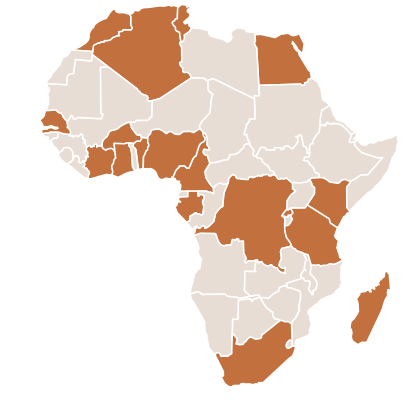
Structured address fields, shipping rates down to the neighborhood, and delivery methods that match how Africa really ships, across 24 countries.
Included Free
Cascading Address Fields
Country → Region → City → Neighborhood linked dropdowns. Each choice narrows the next, and the search tolerates missing accents and typos: typing “yaounde” finds “Yaoundé”.
Zone-Based Shipping Rates
Set a price for a whole region, a specific city, or a single neighborhood. The most precise rule always wins, so you charge the right price everywhere.
Shipping Estimate in the Cart
Customers check what delivery to their neighborhood will cost before they reach checkout. No last-step surprise, fewer abandoned carts.
Address Verification
Checks that the city really belongs to the region and the neighborhood to the city. An inconsistent address is flagged before the order is placed.
Zones Manager
Browse, search and filter your regions, cities and neighborhoods by country, and add the ones that are missing. A badge tells you what ships with the plugin and what you added.
Checkout Field Customization
Reorder, rename, hide or require any checkout field, separately for billing and shipping. The AfriRegions address fields stay in place but can be relabelled.
Dashboard & Setup Guide
See at a glance how many countries, regions and cities are active, with a step-by-step checklist that walks you through the first configuration.
Pro features
Pickup Points
Define collection points with address, opening hours and phone. Customers only see the points in their city or region, and the one they pick appears on the order, the email and their account.
Travel Agency Shipping
Intercity delivery through bus companies, priced per route. City beats region beats the default rate, and the customer chooses the agency that suits them.
Express & Same-Day Options
Next to your standard rate, offer Express or Same Day delivery, each with its own surcharge and estimated delivery time.
Free Shipping Threshold & Bar
Set the cart amount above which delivery is free, per method or per rule, and show a progress bar: “Add 2,000 more for free shipping”.
International Phone Field
A phone field with the country flag and dial code that fills itself in (+237, +251…). Every order arrives with a reachable number in international format.
CSV Import / Export
Export every shipping rule to a spreadsheet, edit it in bulk, then import it back. Duplicates are updated, new rules are added automatically.
Mobile App API
A read-only REST API at /wp-json/scpwoo/v1/ with a single /snapshot call for offline-first apps, ETag caching, and a Store API bridge that sends the neighborhood so your app gets the exact same rates as your website.
24 African Countries, Thousands of Zones
Pre-loaded geographic data with regions, cities, and neighborhoods for each country. Add custom zones anytime through the admin panel.
What Our Users Say
Store owners and WordPress developers share their experience with AfriRegions.
“AfriRegions completely transformed our checkout. Before, 30% of orders had wrong addresses. Now it's nearly zero. The cascading dropdowns are intuitive and customers love them.”
“Zone-based shipping was a game changer. We can now charge different rates for Accra vs rural areas. Setup took 10 minutes. Highly recommend for any African WooCommerce store.”
“I install AfriRegions on every client project. The Zones Manager makes it easy to add custom neighborhoods, and the REST API is clean and well-documented. Pro is worth every penny.”
“We manage 12 WooCommerce stores across West Africa. The 25-site license is perfect. The pickup points alone cut failed deliveries by 20%, customers collect at a shop near them instead of waiting at home.”
“The Travel Agency shipping method is exactly what we needed. Our customers pick their preferred bus company at checkout and we ship via that route. No other plugin does this.”
“Great plugin with solid documentation. The free version covers most needs. I upgraded to Pro for the CSV import, migrating 500+ neighborhoods from a spreadsheet was seamless.”
Frequently Asked Questions
AfriRegions ships with 24 countries: Algeria, Angola, Benin, Burkina Faso, Cameroon, Cote d'Ivoire, DR Congo, Egypt, Ethiopia, Gabon, Ghana, Kenya, Madagascar, Mauritius, Morocco, Mozambique, Nigeria, Rwanda, Senegal, South Africa, Sudan, Tanzania, Tunisia and Uganda, each with its regions, cities and the neighborhoods of major urban areas. Only the countries you added to your WooCommerce selling and shipping locations are loaded, which keeps your store fast.
Yes. AfriRegions is tested up to WooCommerce 9.4 and WordPress 7.0, and is fully compatible with HPOS (High-Performance Order Storage). The neighborhood bridge for the Store API needs WooCommerce 8.9 or newer.
Absolutely. In WooCommerce → AfriRegions → Zones you can browse the tree country by country, search it, then add a missing city inside a region or a missing neighborhood inside a city. A badge tells you whether a place ships with the plugin or was added by you, and anything you added can be removed again.
You add an AfriRegions method to a WooCommerce shipping zone, then build rules: a region (required), optionally a city, optionally one or more neighborhoods, and a price. The most precise rule always wins, a neighborhood rate beats a city rate, which beats a region rate, which beats the default price. You can also hide the method entirely when no rule matches.
Yes, from the Checkout tab. Turn on field customization and you can reorder fields by dragging them, rename their labels, and choose which ones are visible or required, separately for billing and shipping. The AfriRegions City, Region and Neighborhood fields are always shown, but you can relabel them, for example "District" instead of "Neighborhood".
Free covers the address cascade for 24 countries, shipping rates by region, city and neighborhood, address verification, the cart estimate, the Zones manager, the checkout field customization and the dashboard. Pro adds pickup points, travel agency shipping, Express and Same Day options, the free shipping threshold and progress bar, the international phone field, CSV import/export, and the REST API for mobile apps.
Three, added to any WooCommerce shipping zone: "AfriRegions - Region / City / Neighborhood rates" (free), "AfriRegions - Pickup Point" (Pro) and "AfriRegions - Travel Agency" (Pro). The first one can also offer Express and Same Day tiers, each with its own surcharge and estimated delivery time.
Yes, in Pro. Turn it on in AfriRegions → Developer, then read public, read-only JSON at /wp-json/scpwoo/v1/. A single /snapshot call returns the whole dataset for offline-first apps, ETag / If-None-Match gives you near-free 304 re-checks, and the rate limit is 120 requests per minute. Shipping prices themselves come from the native WooCommerce Store API, to which AfriRegions adds a scpwoo/neighborhood address field so your app gets the exact same rates as your website.